
Google Translate PDF
Auto PDF Translation in 120+ Languages with AI
Upload or drop document to translate
Max. file size 1 GB
Revolutionizing Communication
Why Google Translate isn't Enough
Google Translate leverages artificial intelligence to translate documents in various formats fast. These include Word, PDF, and plain text. Nevertheless, it has notable limitations. The most common is formatting issues, which make it unsuitable for specific business applications that demand the preservation of the document's structural integrity. For example, when translating a pitch deck where the arrangement of images and text must remain unchanged, or when dealing with essential documents like business contracts and proposals.
DocTranslator stands out as a superior translation service to Google Translate. It performs better in niche scenarios. The platform, though powered by the Google Translate AI engine, additionally incorporates Optical Character Recognition (OCR) technology. DocTranslator can convert PDF files into 100 languages while ensuring that the original formatting remains intact, thus avoiding any reformatting hassles. It also captures the cultural and idiomatic aspects of the translations. The OCR technology provides the means to extract text from scanned documents, broadening its usability.
Beyond Google Translate: Next-gen PDF translation tool
When organizations and professionals become frustrated with the misinterpretation of their value propositions in different languages, they turn to DocTranslator. Our platform is designed to meet the enterprise communication requirements of numerous companies that engage with international clients. DocTranslator enables them to remain agile while enhancing their local and global presence. It is an ideal choice for those who have outgrown legacy tools such as Google Translate and are in search of a smarter, enterprise-grade solution.
Translate your PDF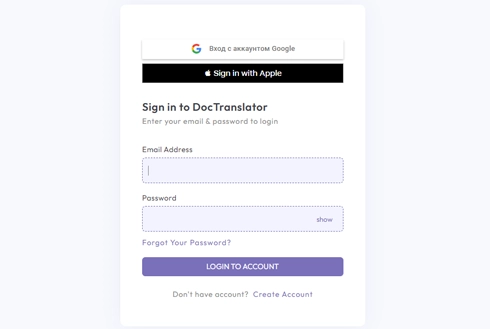
Meet DocTranslator!
DocTranslator offers seamless translation for Word files, PDFs, and PowerPoint presentations. Powered by Google Translate, it ensures accurate, professional-quality translations while preserving the original document format. With DocTranslator, enjoy fast, reliable translations without the limitations of standard tools.
Try DocTranslator free →
Disadvantages of Using Google Translate for PDF Translation
Although Google Translate is a convenient tool for many users, it has several drawbacks that make it less effective for critical document translations:
Poor contextual intelligence
Google Translate tends to generate translations that are primarily literal and superficial. It overlooks the cultural context required for clear communication. This is apparent in idiomatic expressions, industry-specific language, or regional dialects. The resulting job sounds awkward, misconstrued, or very erroneous.
Inconsistent quality across language pairs
Translation fidelity is notably inconsistent across various language combinations. While prominent languages often achieve acceptable accuracy, lesser-used languages may result in inferior translations, which can compromise the reliability of the tool for global companies with diverse content needs.
Unsuitable for business-critical use cases
Google Translate is not designed for high-precision use cases. It is advisable to avoid its application in business, legal, technical, or specialized terminology, as well as in situations involving privacy concerns. It is more fitting for informal, personal translations.
Formatting failures in scanned files
PDFs require structural preservation: tables, headers, visuals, and layout must remain intact. Google Translate disrupts the original formatting in image texts, leading to misaligned or unusable output that creates more work for teams downstream.
Crowdsourced inputs and data privacy concerns
It incorporates crowdsourced translations that introduce potential discrepancies, reducing the quality. Another concern is that uploading sensitive content into a consumer-grade platform poses significant data privacy risks, particularly for organizations operating in regulated industries.
Unlock True Impact with DocTranslator
Enterprise-ready PDF translation that goes far beyond what Google Translate can offer.
Enterprise-grade accuracy
AI-powered translations that retain tone, terminology, and intent, ideal for regulated and technical content.
Format preservation
Maintains original structure, layout, and design across all major file types including PDFs and Word docs.
High-volume capability
Supports files up to 5,000 pages or 1GB, with batch translation for bulk workflows.
100+ languages supported
Enables seamless communication across global markets and regions.
Built-in OCR
Translates scanned documents and image-based files without external tools.
Browser-based access
No downloads or installations. Accessible anywhere, instantly from any device.
Editable output
Delivers clean, editable files, ready for final review or publishing.
Data security
No content is stored post-session; compliant with GDPR, HIPAA, and more.
Cost-efficient
From $14.99/month, built for budget-conscious global operations.
Rapid turnaround
Fast, automated processing to meet tight deadlines at scale.
The Best Choice
DocTranslator is the #1 Best Alternative to Google Translate
DocTranslator.com is an AI-powered document translation platform that supports PDF, Word, and Excel formats in 100+ languages. With pricing starting at $0.005 per word, it delivers scalable, cost-efficient alternatives to traditional Google Translate.
Switch to DocTranslator →See It In Action
Best alternative to Google Translate
Watch this video to learn what sets Doctranslator apart.
Choose Your Plan
Start with a 7-day trial for $2, then $14.99/month, or save more with annual billing
7-Day Trial
MOST POPULARthen $14.99/month after trial ends
- 7-day full access trial
- Trial limit: 10 pages or 3,000 words
- $0.005/word AI translation
- 120+ languages
- PDF, DOCX, XLSX, PPTX, IDML, TXT, JPG, PNG, CSV, JSON
- Team access & custom glossaries
- Email support
Monthly
POPULARRegular price $29.99, now 50% off
- 100 pages or 30,000 words per month
- $0.005/word AI translation
- 120+ languages
- Unlimited file storage
- PDF, DOCX, XLSX, PPTX, IDML, TXT, JPG, PNG, CSV, JSON
- Team access & custom glossaries
- Priority email support
Annual
SAVE 25%~$11.25/month, save 25% vs monthly
- 100 pages or 30,000 words per month
- $0.005/word AI translation
- 120+ languages
- Unlimited file storage
- PDF, DOCX, XLSX, PPTX, IDML, TXT, JPG, PNG, CSV, JSON
- Team access & custom glossaries
- Priority email support
Google Translate vs DocTranslator for PDFs
Both run on Google's translation engine. The difference is what happens to your file around the text.
Google Translate
- ✕ Caps document uploads at about 10 MB, so large PDFs will not go through
- ✕ Often breaks tables, columns and layout in the translated file
- ✕ Limited with scanned PDFs and image-based pages
- ✕ A consumer tool, with files sent to a shared service
- ✕ Output is not always editable or ready to send
DocTranslator
- ✓ Handles files up to 1 GB or 5,000 pages, with no 10 MB wall
- ✓ Keeps the original formatting, tables and page layout
- ✓ Built-in OCR reads scanned PDFs, JPGs and PNGs
- ✓ Encrypted, and your files are not stored after the session
- ✓ Same Google translation engine, 120+ languages, editable output
How DocTranslator Works
Step 1: Create a free account
Complete the registration by filling out your name, email address, and a password. This process is quick and will only take a few minutes.
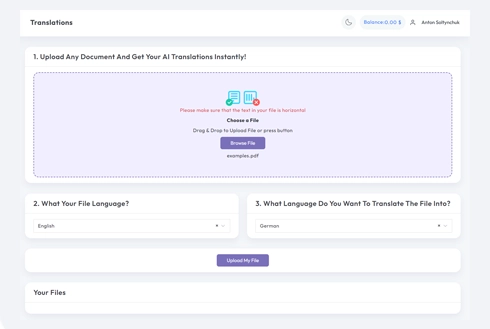
Step 2: Upload your file
Submit files in Word, Excel, PowerPoint, TXT, InDesign, or CSV formats. You have the option to drag and drop or access them from your device.
Step 3: Select languages
Specify the language of the original text and the language into which you wish to translate. Enter it directly or choose from a predetermined list.
Step 4: Translate and download
Click the 'Translate' button. Your document will be processed, and you will subsequently be able to download it. The initial layout and design will remain intact.
Google Translate PDF: Frequently Asked Questions
Can Google Translate translate a PDF?
Yes, Google Translate has a document mode that accepts PDFs, but it caps uploads at about 10 MB, struggles with scanned PDFs, and often changes the layout. For larger files, scanned pages, or when the formatting has to stay intact, DocTranslator uses the same Google engine while keeping the document structure and reading scans with OCR.
How do I translate a PDF with Google Translate?
On translate.google.com, open the Documents tab, upload your PDF, choose the source and target languages, then download the result. If the file is over 10 MB, is a scan, or needs its layout preserved, upload it to DocTranslator instead and download a formatted copy in minutes.
Why is my PDF not translating in Google Translate?
The usual reasons are that the file is larger than the 10 MB limit, it is a scanned image with no selectable text, or it has complex formatting. DocTranslator handles all three: files up to 1 GB, built-in OCR for scans, and the original formatting kept.
Can I translate a scanned PDF?
Yes. DocTranslator reads text inside scanned PDFs and images with built-in OCR, so photographed or scanned pages translate just like regular text-based PDFs.
Is it free to translate a PDF?
DocTranslator offers a 7-day trial for $2 (up to 10 pages or 3,000 words). After that, the Monthly plan is $14.99/month (100 pages or 30,000 words) and AI translation runs at $0.005 per word. All plans include 120+ languages.
Does it keep the PDF formatting and how many languages are supported?
Tables, fonts, images and page layout come back as they were, so you translate the document, not just the text. DocTranslator supports more than 120 languages, including Spanish, French, German, Chinese, Japanese, Arabic, Hindi, Portuguese and Russian.
START TRANSLATION!
Sign up today and elevate your business for impact.
More Translation Tools
File Formats
Our Partners